What you can do
Recovery first, cleanup second — both tuned for Android storage.
Recover photos
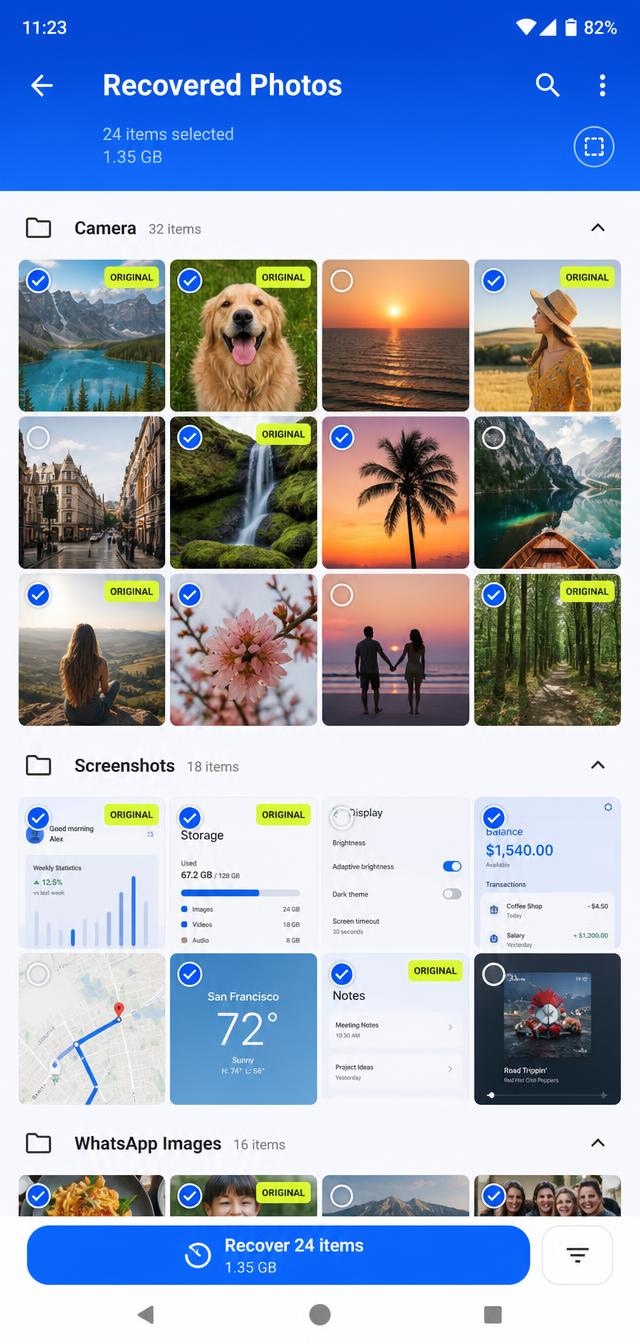
Scan for images that were deleted or left behind. True Recovery highlights originals so you are not stuck scrolling through thousands of tiny thumbnails.
Recover videos
Find leftover and trashed videos and restore the ones worth keeping.
Recover other files
Look for documents, audio, archives, and APKs that are still on storage.
Remove duplicate photos
Only identical photos are grouped. Each set keeps the highest-resolution copy. Extras go to the Android trash for 30 days — not permanently deleted.
Remove junk files
Clear thumbnail caches, empty files, leftover temp files, and old APK installers. Your photos, videos, and documents never appear on this list.
How True Recovery works
A transparent five-step process.
Grant All files access
So the app can look beyond the gallery and into the folders Android keeps out of sight.
Choose what to look for
Photos, videos, or other files such as documents, audio, archives and APKs.
System deep scan
Easy Recovery reads the system trash first, then scans storage.
Grouped results
Results are grouped by folder. Originals are marked, and low-quality thumbnails can be hidden.
Recover, never overwrite
Files are copied to Pictures/True Recovery (or the matching Movies, Music or Download folder). The source is never overwritten or deleted.
Built to be careful.
This is a recovery app first. The cleanup tools are conservative on purpose.
- !Duplicate photos are moved to the system trash, not erased forever.
- !Every duplicate set always keeps one copy — the sharpest one.
- !Thumbnail cache is not pre-selected, because that is also where many deleted photos are found.
- !Files you already recovered are kept out of junk cleanup.
Please note
“Recovery depends on what is still on the device. If a file has been overwritten, factory-reset, or securely erased, no app can bring it back. True Recovery does not claim to recover every deleted file — it finds what is still there and makes the originals easy to spot.”
PERMISSIONS
Storage permission is required to scan and restore files. We do not use that access for anything else.